
|
|
|||||||
 |
|
|
Thread Tools | Search this Thread | Display Modes |
 03-28-2024, 12:12 PM
|
#1 |
|
Junior Member
Join Date: Mar 2024
Posts: 1
|
 "Please allow your DisplayLink device to connect to this Mac." message
Hi everyone, recently I started seeing the info message below, and my devices regularly are no longer being detected. I need a lot of restarts.
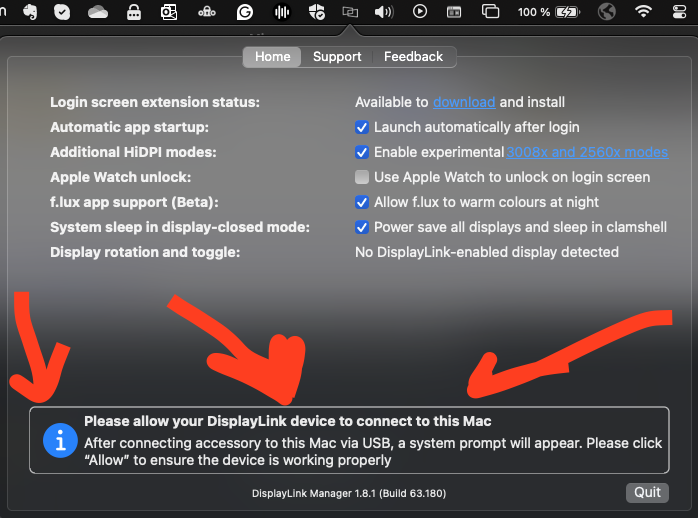 "Please allow your DisplayLink device to connect to this Mac. - After connecting accessory to this Mac via USB, a system prompt will appear. Please click "Allow" to ensure the device is working properly" I never get any new pop-up, when I connect devices. Is anyone having this problem? I'm using Sonoma 14.4. |

|

|
|
03-29-2024, 11:00 AM
|
#2 | |
|
Super Moderator
Join Date: Jan 2015
Posts: 636
|

Quote:
In other words, USB device approval status may not be playing a part in the behavior you describe. If the original manufacturer of your DisplayLink-based product is not able to provide assistance, then you can report the issue directly to DisplayLink by following the process outlined here --> https://support.displaylink.com/know...to-displaylink |
|
|
|
|
|
04-13-2024, 05:35 AM
|
#3 |
|
Junior Member
Join Date: Apr 2024
Posts: 2
|
I have exactly the same issue. I recently purchased a Minisopuru dock and having installed the DisplyLink software it worked.
However, after selecting an option from the tool bar (disconnect?) it no longer works and will not reconnected. macOS Sonoma 14.4.1 |
|
|
|
|
04-27-2024, 02:02 PM
|
#4 |
|
Junior Member
Join Date: Apr 2024
Posts: 1
|
I have exactly the same issue.
I use GiGimundo LK10 docking station my MacBook Pro based on M1 CPU, Sonoma 14.4.1. Do you have any idea what could be the issue? |
|
|
|
|
05-03-2024, 03:23 PM
|
#5 | |
|
Junior Member
Join Date: May 2024
Posts: 3
|
I have the same issue and there are even other threads in this forum opening up with the exact same issue. The manufacturer sends us back to your software. It's not a hardware issue, it's a software issue because as many users state here... it was working, now it's not. All of theses people's hardware didn't crash on the same date (since the last apple OS update). Please take these reports seriously and update your software.
Quote:
|
|
|
|
|
|
05-07-2024, 11:45 AM
|
#6 | |
|
Super Moderator
Join Date: Jan 2015
Posts: 636
|
Quote:
As I understand it, there are two different things happening in this thread. 1. 'Something' is not working. I say 'something' in quotes because I myself am not sure of the cause. 2. In describing the original issue the original poster suggested that a message within the DisplayLink Manager Application may have been a indicator to the source of the issue. I merely pointed out that the message they highlighted will always be present, even if everything is working as expected. As I mentioned previously, if the original manufacturer of your DisplayLink-based product is not able to provide assistance, then you can report the issue directly to DisplayLink by following the process outlined here --> https://support.displaylink.com/know...to-displaylink |
|
|
|
|
|
05-25-2025, 02:25 AM
|
#7 |
|
Junior Member
Join Date: May 2025
Posts: 1
|
Stumbled onto this thread a bit late.
If it's happening on a Silicon Macbook, you may want to go into your Privacy & Security Settings, scroll all the way down and change "Allow Accessories to Connect" to "Every Time" Then disconnect and reconnect your monitor. It's related to USB Restricted Mode on new silicon-based Macbooks. Not an issue for desktop Macs. https://support.displaylink.com/know...cted-mode-prot |
|
|
|
|
06-19-2025, 09:56 PM
|
#8 | |
|
Junior Member
Join Date: Jun 2025
Posts: 1
|
Any Updates?
Quote:
This is for a macOS 15.5 |
|
|
|
|
|
06-26-2025, 10:42 AM
|
#9 |
|
DisplayLink Team

Join Date: Mar 2025
Posts: 138
|
Hello boxcar_plus44,
Please contact directly our support team and send us some more data by following these steps.
__________________
Marta Jaroch DisplayLink Team Where to download the latest DisplayLink drivers How to report macOS issues to DisplayLink tech support for a speedy resolution |
|
|
|
|
08-22-2025, 12:51 PM
|
#10 | |
|
Junior Member
Join Date: Aug 2025
Posts: 1
|
Quote:
 Also, I get more than just the info at the bottom in the DisplayLink app. Mine won't even give me any options. 
|
|
|
|
|
|
|
|


 Linear Mode

