
|
 12-07-2013, 08:04 AM
|
#41 |
|
Member
Join Date: Feb 2009
Posts: 36
|

A status-update would be nice, because this issue really sucks.
Just an information for you: For me and my collegues it don't matter if it is a problem with Microsoft or Displaylink or both. For us as an enduser the problem is with DisplayLink, because it only happens with the tiny screens that are using DisplayLink. |

|

|
|
12-15-2013, 09:59 AM
|
#42 |
|
Junior Member
Join Date: Dec 2013
Location: Amsterdam
Posts: 3
|
I have the same problem with my MIMO 720F Touchscreen USB Monitor (7" 800x480) built in the case. I use latest driver 7.5 M0 and AIDA64 for monitoring.
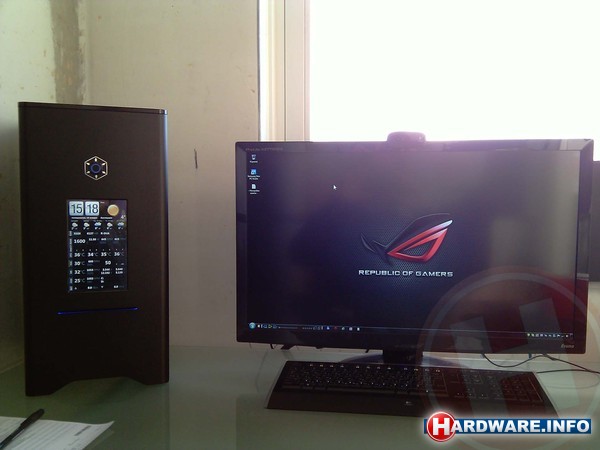 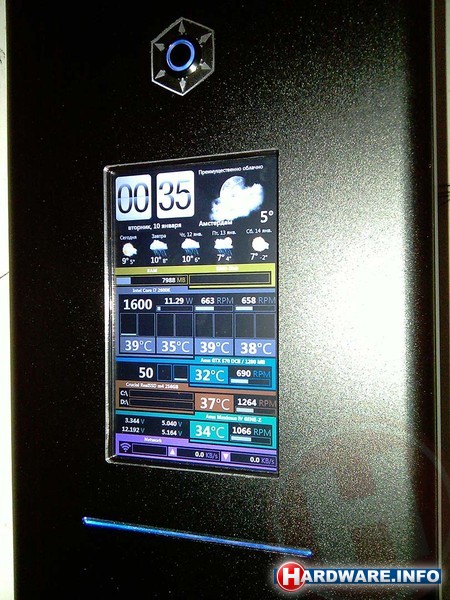 Windows 7 = no problem Windows 8 = no problem Windows 8.1 / display in landscape = no problem Windows 8.1 / display in portrait = sucks / black display, i see only mouse cursor 
|
|
|
|
|
12-15-2013, 02:56 PM
|
#43 |
|
Junior Member
Join Date: Dec 2013
Posts: 6
|
Not only on small screen!!
Hi, have the 7.5 driver issue with "windows 8.1". with 22" screens... In protrait mode. Did not think to test landscape mode, indead!!! But whatever the screen disposition there is a "bug"
Best regards |
|
|
|
|
01-09-2014, 10:56 AM
|
#44 |
|
Junior Member
Join Date: Oct 2013
Posts: 9
|
Are there any news?
|
|
|
|
|
02-28-2014, 06:54 PM
|
#45 |
|
Junior Member
Join Date: Dec 2013
Location: Amsterdam
Posts: 3
|
 Driver 7.5 M1 don't working
I try today a new driver 7.5 M1.
It's working, ... before i restart my PC. And then the same story: black screen with mouse cursor, charm bars, metro start menu, BUT I CAN'T SEE DESKTOP  DISPLAYLINK, TELL US: ARE YOU WORKING ON THIS PROBLEM ????????? |
|
|
|
|
04-16-2014, 09:37 AM
|
#46 |
|
Junior Member
Join Date: Dec 2013
Location: Amsterdam
Posts: 3
|
Driver 7.5 M2
Driver 7.5 M2 - no changes, all the same problems
|
|
|
|
|
04-17-2014, 11:20 AM
|
#47 |
|
Senior Member
Join Date: Feb 2009
Posts: 1,561
|
There is no fix DisplayLink can do for this issue. It looks like Windows 8.1 does not support displays with a resolution width of less than 640 pixels. This is probably a design decision by Microsoft.
You get the same behaviour with a directly connected screen, so it independent of DisplayLink's driver. Wim |
|
|
|
|
07-07-2014, 01:32 PM
|
#48 |
|
Senior Member
Join Date: Feb 2009
Posts: 1,561
|
We have raised this with Microsoft and they have closed it as invalid. Windows 8 onwards only supports resolutions of 1024x768 and above. They have cited the following references for this:
Windows Certification Newsletter - March 12, 2013 http://msdn.microsoft.com/en-us/libr.../dn609870.aspx Microsoft Reduces Minimum Resolution Requirement To Enable Cheaper, Smaller Windows Devices http://microsoft-news.com/microsoft-...ndows-devices/ System requirements: http://windows.microsoft.com/en-us/w...m-requirements Therefore there is no fix we can do for this and it is a limitation of Windows 8 onwards. Wim |
|
|
|
|
12-08-2014, 12:17 PM
|
#49 |
|
Junior Member
Join Date: Dec 2014
Posts: 2
|
Hey, I just registered to this forum only to tell you my workaround for the problem with Windows 8 the minimum resolution width of 640 pixels:
As described previously you can circumvent the black display problem by rotating the screen into landscape mode (increases horizontal resolution of displays normally used in portrait mode) and pressing the win+d combination. So I wrote a AutoIt script for myself which is activated via a shortcut, which quickly rotates my small portrait screen into landscape, presses win+d, rotates the screen back to portrait mode and restores all windows back by sending win+d again. I just klick this shortcut after I turned the pc on and can use my 7" monitor without problems. This does not solve the problem but enables you to live with it pretty well. I used the following program in my script, which enables me to rotate only the second screen: http://noeld.com/programs.asp?cat=misc#display My script looks as follows: Run("C:\display.exe /device 2 /rotate 0") Sleep(1000*2) Send("#d") Run("C:\display.exe /device 2 /rotate 90") Sleep(1000*2) Send("#d") Last edited by flow28; 12-08-2014 at 02:39 PM. |
|
|
|
 |
| Thread Tools | Search this Thread |
| Display Modes | |
|
|


 Linear Mode

