
|
|
|||||||
 |
|
|
Thread Tools | Search this Thread | Display Modes |
|
|
 02-26-2020, 09:10 PM
|
#1 |
|
Junior Member
Join Date: Feb 2020
Posts: 1
|

First, you need to navigate to the program’s preferences. For example, if you’re using Adobe Illustrator, you need to click on Illustrator > Preferences. Here, click on the GPU Performance tab on the left.
Deselect the GPU performance option and click OK. 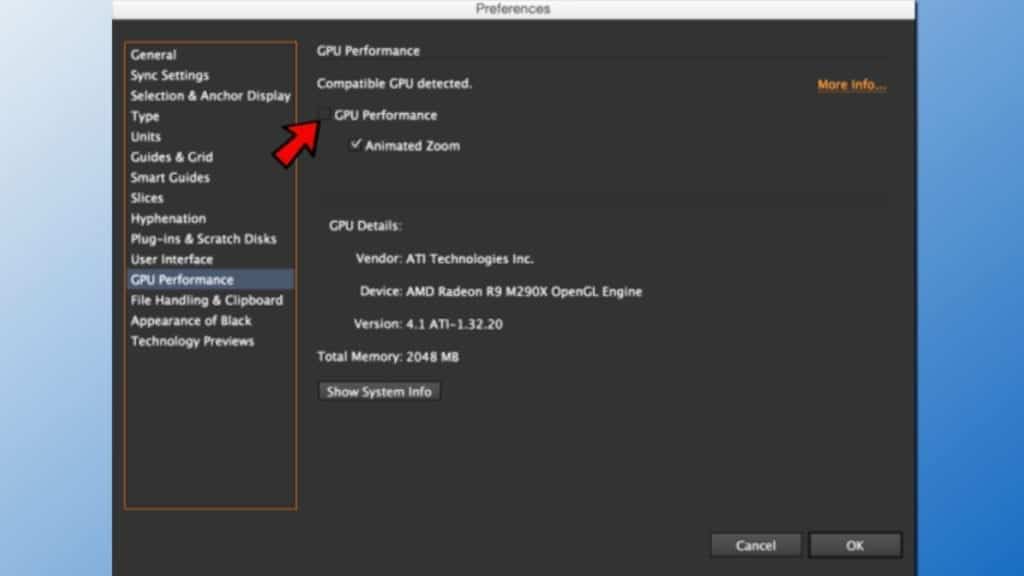 https://geeksadvice.com/fix-aigpusni...ectedly-error/ |

|

|
|
03-11-2020, 03:06 PM
|
#2 |
|
Junior Member
Join Date: Feb 2020
Posts: 2
|
Thanks!
Thanks for the reply, this solution works for me!

|
|
|
|
|
| Thread Tools | Search this Thread |
| Display Modes | |
|
|


 Hybrid Mode
